Do websites have to be ADA compliant? In practice, yes. Courts and the Department of Justice treat business websites as covered under Title III of the ADA, as long as the business is open to the public. That’s true even though the ADA predates the modern web by years. Most commercial websites, plus every state and local government site, are expected to be accessible to people with disabilities.
So what does this mean for your business? Your website’s accessibility requirements depend on the type of business you operate and the services you provide. Here’s what to know about ADA coverage, accessibility standards, exemptions, and the steps you can take to improve your site.
Who Has to Comply With ADA Website Requirements?
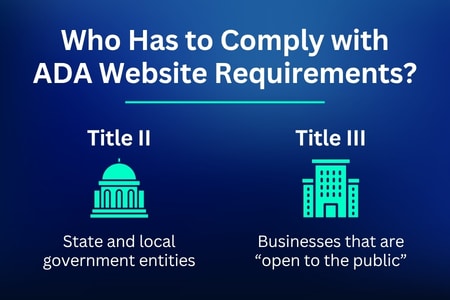
The ADA splits coverage into two titles. Figuring out which one applies depends on who you are and who your site serves.
- Title II covers state and local government entities. Every state and local government website, from a city’s online bill pay portal to a public school’s registration page, is expected to be accessible.
- Title III applies to businesses that are “open to the public,” which the ADA refers to as places of public accommodation. Retail stores, restaurants, medical offices, hotels, and law firms are among the businesses covered. Their websites, apps, and other digital properties may also fall under those requirements.
Most businesses fall under Title III. If your business has a physical location that serves the public, or if your website itself functions as the business (an online store, for example), you’re very likely covered. That applies regardless of company size.
Do business websites have to be ADA compliant even if they’re small? In almost every case, yes. There’s no blanket size exemption once a business is open to the public, though a narrow operational exemption does exist for very small or seasonal operations, which we’ll cover below.
What Standard Do ADA-Compliant Websites Have to Meet?
Here’s where it gets a little murky. The ADA itself doesn’t spell out a specific technical standard for websites. Congress passed the law in 1990, before the web existed in any commercial sense, so it never defined what an “accessible website” actually looks like.
The ADA doesn’t name a specific set of technical requirements for websites. In practice, the Web Content Accessibility Guidelines (WCAG) have become the standard most often used to assess website accessibility. The Department of Justice’s 2024 Title II rule requires state and local governments to meet WCAG 2.1 Level AA. WCAG also comes up frequently in Title III cases involving business websites.
One case shows exactly how this plays out for businesses. In Robles v. Domino’s Pizza (2019), a blind customer sued Domino’s after he couldn’t order a pizza through its website or app using screen-reading software. The Ninth Circuit ruled that the ADA applied to Domino’s website because it connected customers to the goods and services of a physical restaurant, a public accommodation, regardless of where the customer accessed it from. The case eventually settled, with Domino’s agreeing to bring its site up to WCAG 2.0 standards.
Put it all together, and the answer to when websites have to be ADA compliant becomes clear. As soon as they’re connected to a business or government entity that serves the public. WCAG 2.1 AA is the standard to aim for, even though the ADA text itself never named it directly.
Not sure whether your current site would hold up against these standards? Oyova’s ADA compliance audits and remediation services can tell you exactly where you stand and what it would take to fix it.
Are Any Websites Exempt From ADA Compliance?
Given how broadly Title II and Title III apply, true exemptions are narrow. A handful of situations may reduce or remove the obligation to comply, but they’re the exception, not the rule.
Small Business and Religious/Private Club Exemptions
Some very small businesses may not have to meet Title III requirements. The exemption can apply to a private business that operates fewer than 20 weeks in a year and has fewer than 15 full-time employees. That doesn’t mean every small business is exempt. A business that operates year-round will generally still be subject to the ADA.
Churches, synagogues, and mosques are generally exempt from Title III when they are operating as religious organizations. The same exemption can apply to private clubs that aren’t open to the public and restrict membership.
Are churches exempt from ADA compliance across the board? Not necessarily. A church-run school or event space can be treated differently from the church’s religious services and facilities. In those situations, the activity or facility itself can determine whether Title III applies.
There’s one more angle worth knowing about. Financial hardship can also factor in. If bringing a website into compliance would create a significant financial burden or fundamentally change the nature of the service, an entity may be able to claim an exemption. It must substantiate this with real evidence, though, and it tends to hold up to legal scrutiny only in genuinely extreme cases.
Other Grey Areas
A few other situations sit in less clearly defined territory.
- Purely informational sites. A personal blog or a site that doesn’t facilitate transactions and isn’t tied to a physical, public-facing business sits more in a grey area than a commercial site does.
- User-generated content. Forums, review sites, and social platforms can be harder to evaluate because users create much of the content. That can make it less obvious where responsibility for accessibility falls.
- Third-party tools. If a business uses a third-party booking system, chat widget, or payment processor that isn’t accessible, responsibility can be murky between the business and the vendor.
- Website builder platforms. Are Wix websites ADA compliant out of the box? Not automatically. Platforms like Wix, Squarespace, and Shopify give site owners the tools to build accessible pages, but the responsibility for actually using them (proper heading structure, alt text, color contrast, and so on) still falls on the business.
None of these grey areas guarantees an exemption. They’re situations where the answer depends on specifics, which is exactly why getting a professional opinion matters more than guessing.
Why Compliance Matters Even If You Might Qualify for an Exemption
Even in the narrow cases where a website might technically qualify for an exemption, there’s a strong case for building toward accessibility anyway.
Legal risk. Website accessibility lawsuits have climbed for years, and they aren’t limited to large companies. If there’s any ambiguity about whether your exemption actually applies, and there often is, you’re exposed to the same risk of being sued as a fully covered business.
Market reach. People with disabilities make up a significant part of the U.S. population. If your website isn’t accessible, some potential customers may struggle to use it or complete a purchase.
SEO benefits. Many accessibility fixes, like proper heading structure, descriptive alt text, and logical navigation, overlap directly with what search engines look for when crawling and ranking a site. Accessibility work and SEO work aren’t separate projects; they reinforce each other.
Reputational upside. Making accessibility improvements before a problem arises can also benefit your business’s reputation. It shows customers that your business takes accessibility seriously and can help you avoid making changes under pressure.
If any of this sounds like a conversation you’ve been putting off, it might be worth starting with a professional ADA compliance audit rather than guessing where you stand.
How to Check and Maintain ADA Website Compliance

A quick review won’t tell you everything that’s wrong with a website. ADA scanning tools can find issues such as missing alt text and poor color contrast, but they don’t catch everything. A WCAG 2.1 AA audit looks for additional accessibility problems. Screen reader testing is also important because an automated scan can’t show how the site works for someone using assistive technology.
So what does fixing it actually involve? How do I make my website ADA compliant? At a high level, it usually comes down to a few key things.
- Making sure all images have accurate, descriptive alt text
- Ensuring the site is fully navigable by keyboard, not just mouse
- Using clear heading structure and labels on forms
- Providing captions on video content
- Testing with real assistive technology, not just automated scanners
None of that is a one-time project. New pages, new features, and design updates can all introduce new issues, which is why most businesses find it easier to work with a team that handles both the initial audit and ongoing remediation rather than trying to manage it internally from scratch.
Work With Oyova Today!
Whether your website clearly falls under Title II or Title III, or you’re not entirely sure where you land, the safest move is to treat accessibility as a standard part of doing business online rather than a legal question to sort out only after a demand letter arrives.
At Oyova, we offer ADA compliance audits and remediation services. Our team assesses your current site against WCAG 2.1 AA, identifies exactly where the gaps are, and provides actionable recommendations, or handles the remediation directly, so you’re not left guessing.
Need help making your website ADA compliant? Contact Oyova today for a detailed ADA compliance audit and discover how our remediation services can transform your digital presence.
Disclaimer: The information provided in this blog is for general informational purposes only and is not intended as legal advice. The contents of this blog may not reflect the most current legal standards or interpretations. For specific legal advice regarding ADA compliance or other legal issues, please consult with a qualified attorney. Oyova does not guarantee the accuracy, completeness, or usefulness of any information on this site and is not responsible for any errors or omissions or for the results obtained from the use of this information.
FAQs
Not every website, but most commercial and government websites are covered. If your site belongs to a business open to the public or a state or local government entity, it almost certainly falls under Title III or Title II. Narrow exemptions exist for very small, seasonal businesses and for religious organizations and private clubs, but most sites don’t qualify.
There’s no specific date or threshold that triggers the requirement; it applies as soon as a business open to the public, or a government entity, has a website connected to its goods, services, or programs. There isn’t a grace period tied to how long a business has existed or how new the site is.
Yes, in almost all cases, if the business is open to the public. This applies to small businesses as much as large ones, with the narrow exception of businesses that operate fewer than 20 weeks a year with fewer than 15 full-time employees.
Any website tied to a business that’s open to the public, along with all state and local government websites. This covers everything from e-commerce stores and restaurant sites to professional service firms and medical practices.
You face the risk of a lawsuit or demand letter, along with the practical cost of turning away visitors who can’t use your site. Settlements and legal fees can add up quickly, and non-compliance carries other business consequences beyond legal risk.
Yes. Website accessibility lawsuits have become increasingly common and aren’t limited to large corporations; small and mid-sized businesses are regularly named as well. You can read more about how these lawsuits typically arise.
Begin with a WCAG 2.1 AA audit to identify accessibility issues that an automated scanner may miss. You may need to address things like alt text, keyboard navigation, heading structure, video captions, and compatibility with assistive technology. Some businesses handle these updates internally, while others hire a team to manage the audit and remediation.
Related Posts
Website Accessibility Audit Cost and What Drives It
If you’ve started researching website accessibility audits, you’ve probably noticed there’s no one-size-fits-all price. Some websites can be...
Read More
8 Most Common Website Accessibility Issues
Website accessibility issues are easy to miss, especially when your site looks and works fine to you. However,...
Read More
ADA Website Compliance Lawsuits Are Rising: How to Protect Your Business
In 2025, businesses faced more than 3,100 website accessibility lawsuits in federal court alone, a 27% jump from...
Read MoreOur Awards