
Which eCommerce platform is best for SEO? The honest answer is that it depends on your business. The right choice depends on how much control your business needs over technical SEO, content, site architecture, performance, and ongoing optimization.
The wrong eCommerce platform can create SEO headaches later, especially if important technical settings are difficult to change or the platform no longer fits your store. Moving to a new platform can also mean dealing with redirects, lost rankings, and a lengthy migration. A platform that gives your team the right level of SEO control makes it easier to manage product pages, content, site structure, and ongoing optimization as your store grows.
If you’re choosing an eCommerce platform, SEO should be part of the decision from the start. We’ll look at how the major platforms handle technical SEO, content, site structure, and other factors that can affect organic search performance.
The Importance of SEO in eCommerce

When someone searches Google for a product your store carries, SEO can help your site show up in those results. That includes searches for specific products, product categories, comparisons, and questions that come up during the buying process.
But SEO’s impact goes beyond where your store appears in Google. It can also affect how people discover your products, interact with your site, and move toward a purchase.
- More qualified traffic. Someone searching for a specific product or product category already has a reason for visiting your site. Showing up for those searches can bring in visitors who are further along in the buying process.
- Lower reliance on paid advertising. Once a product or category page starts bringing in organic traffic, those visits don’t stop simply because an ad campaign ends. That can give an eCommerce business another source of traffic to build over time, although maintaining organic visibility still takes ongoing SEO work.
- Better understanding of shoppers. Search data can show you what people are looking for, the language they use, and which topics generate interest. That information can help you decide what products, categories, and content to develop.
- More opportunities to reach new customers. An online store isn’t limited to people who already know the brand. Product pages, category pages, and useful content can help a business appear when someone searches for a product or solution they haven’t purchased from the company before.
- Useful content throughout the buying process. Not every shopper is ready to buy on their first visit. Product comparisons, buying guides, FAQs, and other helpful content can answer questions that come up before a purchase.
- A way to compete beyond brand recognition. A smaller eCommerce business may not have the same name recognition or advertising budget as a large competitor. Organic search gives it another way to reach people who are searching for the products or information it provides.
SEO isn’t a one-time project for an eCommerce site. Product pages change, new products are added, search behavior shifts, and competitors keep optimizing their own sites. The platform you choose can make some of that work easier or limit what your team can change.
What Makes an SEO-Friendly eCommerce Platform?
An eCommerce platform affects how much control you have over the parts of your store that matter for SEO. Before choosing one, consider what you can change yourself and where the platform limits you.
1. Flexible URL Structures
Review the URLs a platform creates for products and categories before you commit. Some platforms give you plenty of control. Others automatically add parts of the URL that you can’t change.
You’ll also want to know what happens when a product page moves. Being able to update the URL and create a redirect can save you cleanup later.
2. Responsive Design and Mobile Support
Open an online store on a phone, and you’ll quickly see whether its mobile experience works. Menus, product images, filters, buttons, and checkout all need to be usable on a smaller screen.
Google’s mobile-first indexing also means the mobile version of your site is important for how Google crawls and indexes your pages.
The platform should make responsive design straightforward, but don’t stop there. Test the themes you’re considering on actual mobile devices before settling on one.
3. Page Speed and Performance
Two stores on the same platform can have very different page speeds.
The theme is one factor. So are apps, plugins, images, scripts, hosting, and third-party tools. Adding more functionality also means more for a browser to load.
That’s why it’s difficult to call one eCommerce platform universally “fast.” Look at what you’ll be running on the site, not just the platform’s advertised performance..
4. SEO-Friendly Themes and Structured Data
The platform itself isn’t the only thing to evaluate. Take a close look at the available themes.
A theme with messy code, poor navigation, or an awkward mobile layout can create problems even when the underlying platform has solid SEO features. Also check whether product information is marked up with structured data. Google can use product structured data to better understand information such as prices, availability, and product details.
5. Built-In SEO Controls
At a minimum, you’ll want control over common SEO elements such as page titles, meta descriptions, canonical URLs, XML sitemaps, and redirects.
Some platforms handle these settings automatically. Others give you more options through built-in features, apps, or plugins. The key question is whether you can make the changes your SEO strategy requires without working around the platform.
6. Content Management Features
Product and category pages aren’t the only pages that can bring organic traffic to an eCommerce site. Buying guides, comparisons, FAQs, and blog content can also target searches related to your products.
If content is part of your SEO strategy, check the platform’s CMS before choosing it. You’ll want an easy way to publish and update articles, add images and videos, organize content, and manage the SEO settings for those pages.
7. Social Sharing and Open Graph Support
This likely won’t be the deciding factor when you’re comparing eCommerce platforms, but it’s still worth checking.
Open Graph tags determine what appears when a page is shared on supported social networks. If your store gets traffic from social media, controlling the preview image, title, and description can make sharing pages easier to manage.
SEO doesn’t depend on social sharing, so I’d treat this as an extra feature rather than a core SEO requirement.
8. Control Over Technical SEO
As a store grows, you may need more control over technical details. Depending on the platform, that could include canonical URLs, redirects, robots.txt, custom headers, caching, or other server-level settings.
This is one area where eCommerce platforms can differ substantially. A platform that works well for a small store may not provide the same level of control a larger site needs.
The goal isn’t to find a platform with the longest list of SEO features. It’s to find one that gives your team control over the areas that matter for your store. That can make SEO much easier to manage as the site grows.
SEO Platforms for eCommerce
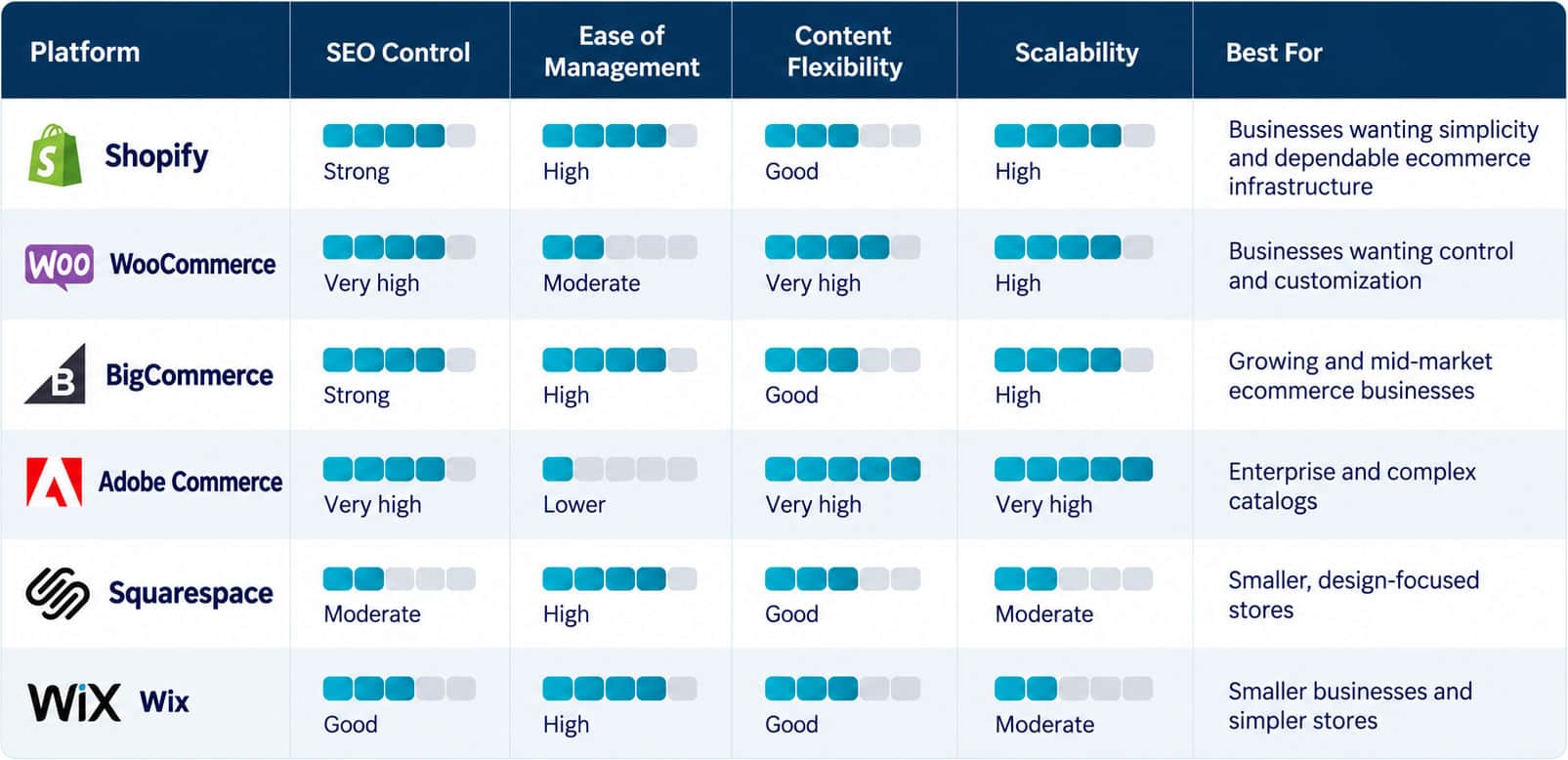
Not all eCommerce platforms offer the same level of SEO control. Some make common tasks easy, while others give you more room to make technical changes. The platforms below take different approaches, so the right fit will depend on what you need from your store.
Shopify SEO
Shopify continues to stand out because it reduces many of the technical barriers that often slow eCommerce SEO progress. Instead of forcing businesses to patch together core eCommerce functionality through multiple tools, Shopify gives store owners a more controlled environment where many foundational needs are already built in.
Shopify SEO Features
Shopify handles several technical SEO tasks behind the scenes. Store owners can also make changes to common SEO elements, including:
- URLs: Product and collection URLs can be customized.
- XML sitemaps: Shopify automatically creates and updates the sitemap.
- Google Analytics: Stores can connect Google Analytics to track website activity.
- Mobile storefronts: Shopify themes are built to adapt to different screen sizes.
That leaves your team to focus on the parts of SEO that require more ongoing attention, such as product descriptions, collection pages, internal linking, and content.
Shopify’s SEO Advantages
If Shopify’s built-in options aren’t enough, its app ecosystem provides additional ways to manage SEO. Apps such as SEO Manager and Plug in SEO add tools for tasks the platform doesn’t cover.
Performance is another part of the equation. Shopify hosts stores on its own infrastructure and uses a global CDN, but an individual store’s speed still depends on factors such as its theme, images, apps, scripts, and other customizations.
Shopify gives you a solid SEO starting point, but the platform doesn’t determine where a store ranks. Content quality, authority, competition, search intent, and technical SEO all play a role.
Who Should Use Shopify?
Shopify makes sense for businesses that want to manage an online store without taking on much technical maintenance. You get less freedom than you would with a heavily customized WordPress and WooCommerce setup, but you also don’t have to manage every part of the underlying site yourself.
Shopify gives store owners a lot of control over everyday changes without requiring them to manage the site’s infrastructure. When a project calls for custom functionality or more involved changes, Shopify development support can handle the work.
When Shopify Makes Sense for SEO
Shopify is usually best for businesses that:
- Want easier store management.
- Don’t have a dedicated developer on the team.
- Need reliable built-in eCommerce functionality.
- Care about SEO but don’t want a highly customized technical stack.
WooCommerce
WooCommerce is a powerful choice for businesses that want flexibility, ownership, and deeper customization.
Because WooCommerce runs on WordPress, it gives you much more control over content structure, category strategy, templates, internal linking, blog architecture, and SEO plugin choices. That flexibility is a big reason many SEO-focused teams still prefer WooCommerce when content is central to the customer journey.
WooCommerce SEO Features
As a WordPress plugin, WooCommerce leverages WordPress’s powerful SEO features, including:
- Robust content management tools
- Access to thousands of SEO plugins like Yoast SEO and RankMath
- The flexibility to edit .htaccess files for advanced SEO configurations
WooCommerce doesn’t “do SEO” for you automatically in the same way people sometimes expect from a more closed platform. Instead, it lets you build a stronger SEO environment through WordPress, plugins, theme development, and smart technical decisions.
WooCommerce still frames SEO success around stronger product content, site optimization, and using SEO tools within the WordPress ecosystem. Businesses considering a move to or from WooCommerce should also think through migration carefully with an eCommerce replatforming checklist that protects the rankings they’ve already earned.
WooCommerce’s SEO Advantages
WooCommerce gives you more control over the site than many hosted eCommerce platforms. Because it runs on WordPress, you can change the site’s code, install SEO plugins, modify templates, and make technical adjustments that may not be available elsewhere.
You’ll also find a large WordPress and WooCommerce community, so you’ll find plenty of documentation, plugins, tutorials, and developer resources when you need help with a particular SEO task.
Who Should Use WooCommerce?
WooCommerce is a strong choice for businesses that want greater control over their eCommerce website, content, and SEO strategy. It’s particularly well suited to small and mid-sized businesses, content-driven brands, retailers with large or complex product catalogs, and companies already using WordPress.
Because WooCommerce integrates directly with WordPress, businesses have extensive flexibility over site structure, URLs, metadata, content, internal linking, schema markup, and other SEO elements.
When WooCommerce Makes Sense for SEO
WooCommerce is worth considering if your store needs more control over how you build and optimize the site. That can be especially useful for content-heavy stores, sites with unusual category or filtering setups, or businesses that want to make bigger changes to templates and technical SEO settings.
It also tends to be a better fit when someone on your team, or a developer or agency you work with, is comfortable managing WordPress. That flexibility comes with more responsibility for updates, plugins, security, and the site’s technical side.
Adobe Commerce
Adobe Commerce, formerly known as Magento, is built for businesses that have outgrown simpler platforms and need serious control over a large or complicated store.
Adobe Commerce SEO Features
Adobe Commerce excels with its robust suite of SEO tools, all easily managed from the admin panel, including:
- Complete control over URL structures and metadata.
- Integration of rich snippets.
- Advanced indexing capabilities that help even extensive product catalogs get crawled and indexed efficiently.
Who Should Use Adobe Commerce?
Adobe Commerce is a strong choice for businesses with complex eCommerce requirements that need more flexibility and control than many out-of-the-box platforms provide. It is particularly well suited for mid-market and enterprise businesses with large product catalogs, multiple brands or storefronts, B2B and B2C sales channels, complex pricing structures, multiple currencies or regions, and extensive third-party integrations.
BigCommerce
BigCommerce sits in a comfortable middle ground, offering more built-in capability than many hosted platforms without the heavy development lift of an enterprise build.
BigCommerce SEO Features
Some of the SEO-related features you’ll find in BigCommerce include:
- URL controls and automatic URL handling
- CDN-supported hosting
- A built-in blog
- Responsive themes
Who Should Use BigCommerce?
BigCommerce is worth a look if you’re running a larger store or expect the catalog to become more complicated over time. It supports things like large product catalogs, product variations, multiple sales channels, and B2B selling. If B2B is part of your plans, you can also see how BigCommerce compares with other options in our guide to B2B ecommerce website development.
The platform also gives store owners control over several SEO settings, including URLs and metadata, while handling structured data and mobile functionality. That can reduce the custom work needed for common SEO tasks, although more specialized requirements may still require development work.
Squarespace for eCommerce SEO
With Squarespace, the basic SEO setup is handled within the platform. The platform automatically generates an XML sitemap, and you can adjust SEO settings for individual pages. The available templates are designed to work across desktop and mobile screens, so you don’t need a separate mobile version of the store to manage.
The templates are a major part of the Squarespace experience. They’re built around visual presentation, which works well for stores where photography and product imagery matter. As with any platform, though, the specific template you choose can affect the site’s layout and performance.
Squarespace also includes social sharing features, so store owners can control how pages and content appear when they’re shared on supported social platforms.
For a smaller store, particularly one where design is a major consideration, Squarespace can cover the basics without requiring much technical work.
Wix for eCommerce SEO
Wix includes several SEO tools directly in the site editor. The Wix SEO Setup Checklist walks users through basic setup and can suggest keywords based on the site. It’s useful for anyone unsure where to start with SEO.
You can also edit page titles and meta descriptions, add alt text to images, and work with structured data. Wix sites use responsive layouts, so the same site looks good on different screen sizes.
For a small store, the main appeal is having these settings in the same place where you manage the website. You don’t need to be an SEO specialist to make basic changes, although more involved technical SEO work may require a developer or someone with more experience.
How to Choose the Right SEO Platform for eCommerce
The comparison above is a helpful starting point, but the best SEO ecommerce platform for your business depends on a few practical questions. Answering these honestly will quickly narrow your options. If you already sell online, these same questions can help you decide whether your current platform still fits or whether it’s time to make a change.
SEO is only one part of choosing an ecommerce platform. Price, features, and day-to-day management also come into play. Here, we’re focusing on the questions that affect SEO.
Who Will Manage It?
Consider who will actually make changes to the store. With Shopify, a small team can handle product pages, page settings, and meta tags without working in code. Shopify handles hosting, security, and platform updates.
WooCommerce gives a developer more room to make technical SEO changes, but WordPress requires more maintenance. Updates, plugins, security, hosting, and other technical tasks all become part of the workload.
Before choosing between them, consider how much of that work your team can realistically take on.
How Large Is Your Catalog?
A store with 50 products has very different SEO needs than one with 50,000. Smaller catalogs usually do well on nearly any platform. Large catalogs bring challenges like faceted navigation, filter-generated URLs, duplicate content, and crawl budget, so you’ll want a platform with strong control over canonicals, URL parameters, and indexing.
Shopify Plus and a well-built WooCommerce site can both handle large or complex catalogs. Adobe Commerce can support highly complex enterprise stores, but its development and maintenance costs make it the right fit for only a small number of businesses.
How Much SEO Control Do You Need?
Start with what you actually need to change. If you’re mainly working with page titles, meta descriptions, alt text, and sitemaps, Shopify has those bases covered.
Things get different when you want to change how the site is structured. WooCommerce gives you more control over URLs, templates, structured data, and indexing.
Are You Planning to Scale?
Scalability should be a major factor in your decision. Switching platforms later is possible, but a migration can put your rankings at risk if you don’t handle redirects, URLs, and metadata carefully. Choose a platform that can support the traffic, product count, and sales channels you expect as you scale your ecommerce business, not just what you need today.
Let The Pros Choose What’s Best For You
There isn’t one eCommerce platform that’s going to fit every business. A store that needs a simple way to manage products and SEO may have different requirements from one with custom functionality, a large catalog, or a dedicated development team.
At Oyova, we work with Shopify, WooCommerce, and other eCommerce platforms. We look at what the site needs to do, who will manage it, and how much customization makes sense before recommending a platform.
Whether you’re launching your first store, planning a move to a new platform, or trying to drive more organic traffic to your existing store, the eCommerce platform you build on will shape your results for years. Our Shopify development and SEO teams help businesses choose, build, and optimize eCommerce sites designed to rank from day one.
Talk with our team today to determine the best eCommerce platform for your business.
FAQs
Shopify and WooCommerce are both commonly used for eCommerce SEO, but they take different approaches. Shopify handles many technical SEO tasks within the platform, while WooCommerce gives you more control over the WordPress site and its underlying code.
BigCommerce is another option, particularly for stores with larger catalogs or more complex eCommerce requirements. The differences between these platforms come down largely to how much control you need over the site’s technical setup and how much of that work your team wants to manage.
The tools you need depend on what you’re working on. Some are useful for keyword research, while others help with technical SEO, rankings, or site crawls.
- Semrush: Keyword research, competitor research, backlink analysis, and site audits.
- Ahrefs: Keyword research, backlink analysis, content research, and site audits.
- Moz Pro: Keyword research, rank tracking, and site audits.
- Google Search Console: Search performance data, indexing information, and sitemap submission.
- Screaming Frog SEO Spider: Site crawling and technical checks, including broken links, duplicate content, and missing metadata.
You don’t necessarily need all five. The right combination depends on your site’s size and the SEO work your team handles.
SEO can help eCommerce businesses because it gives shoppers another way to find products and categories without relying entirely on paid advertising.
The work can include improving product and category pages, creating useful content, fixing technical issues, and making the site easier for search engines to crawl. How much traffic and revenue SEO generates will vary by industry, competition, site quality, and the search terms you’re targeting.
WooCommerce gives you a lot of control over WordPress content. You can create blog posts, guides, category pages, landing pages, and internal links without being limited to the structure of a hosted eCommerce platform.
That flexibility can help stores where content is a major part of the SEO strategy.
WooCommerce gives developers access to WordPress files, themes, plugins, and templates. That lets you change many parts of the site that affect technical SEO.
Shopify takes a different approach. It handles more of the technical setup within the platform, but it limits what you can change. Adobe Commerce provides more customization for businesses with the development resources to manage it.
Technical SEO isn’t a one-time task. URLs, redirects, indexing, and site structure need to be checked as the store changes. Our technical SEO services can help with that work.
Yes. The platform affects URLs, metadata, structured data, redirects, and how much control you have over technical settings.
That doesn’t mean the platform determines where your site ranks. Content, site structure, links, competition, search intent, and technical SEO all affect organic search performance.
Yes, but a migration can create SEO problems if you don’t carry over important URLs and content correctly.
Before the switch, map old URLs to their new locations and set up 301 redirects where needed. After the new site goes live, check page titles, meta descriptions, content, canonicals, internal links, and other key SEO elements.
Google also recommends specific steps for site moves with URL changes. An eCommerce replatforming checklist can also help organize the migration.
Some ranking and traffic changes can happen during a migration, even when the technical work is handled correctly.
Your eCommerce platform controls some of the technical pieces behind your store. Those pieces can affect how AI search systems access and interpret your pages.
The platform itself won’t get a product page into an AI answer. The page still needs useful content, a clear structure, and information that search systems can read.
Our AI SEO checklist covers ways to prepare your site for AI search.
Not necessarily. A platform change is a major project, so it’s worth looking at what is actually limiting your SEO before deciding to migrate.
You can fix some problems without changing platforms. Others may involve platform restrictions around URLs, redirects, indexing, templates, or technical settings. If your current platform prevents the changes your site needs, replatforming may be worth considering.
Related Posts

4 Types of eCommerce Websites
If you want to sell products online, you’ve probably wondered about ecommerce. Oyova discusses the various types of ecommerce websites and their advantages.
Read More
How Long Does It Take to Build an eCommerce Website?
Building an ecommerce website can take anywhere from 6 to 16+ weeks for a simpler launch and 4...
Read More
Browser Bookshop: How Niche Platforms Change Online Retail
Online retail has reached a turning point. Consumers no longer want endless choices, cluttered interfaces, or platforms that...
Read MoreOur Awards