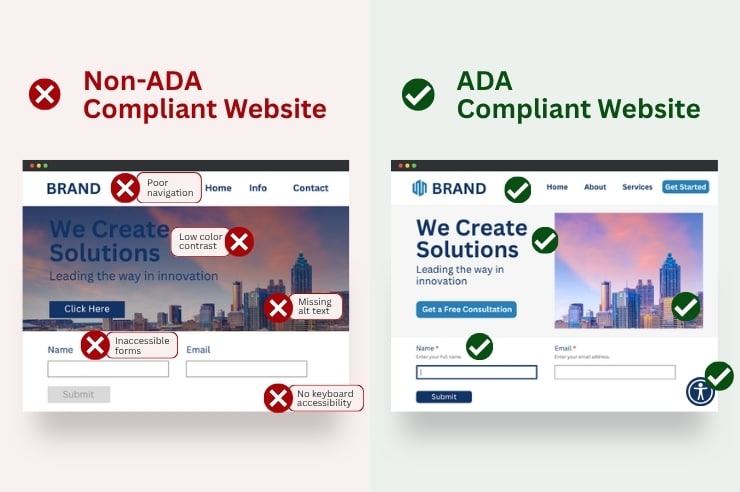
The Americans with Disabilities Act (ADA) was passed in 1990 to guarantee equal access for people with disabilities, and that guarantee now extends to websites, not just physical spaces. Yet despite clear accessibility guidelines, a non-ADA-compliant website is still the norm for many businesses, leaving visitors with disabilities unable to navigate, read, or complete a purchase. Not to mention exposing your business to real legal and financial risk in the process.
In this post, we’ll show real examples of non-ADA-compliant websites alongside examples of sites that get accessibility right, break down what separates the two, and cover the practical steps to close the gap.
Why ADA Compliance Matters for Websites
An accessible website isn’t just about avoiding a lawsuit, though that risk is real. It’s about reaching the full size of your audience: more than 70 million U.S. adults live with a disability, and every one of them is a potential customer your site either welcomes or turns away.
What’s at stake on each side:
- Ignore accessibility, and businesses risk: lost sales from visitors who can’t complete a purchase, damaged trust and reputation, and legal or financial exposure if a complaint turns into a lawsuit.
- Build it in from the start, and businesses gain: access to a larger, often overlooked customer base, a clearer user experience and potential crawlability or image-search benefits, and a lower chance of becoming the next cautionary example.
The good news is that meeting this bar isn’t a mystery. There’s a clear standard to build toward, and knowing it is the first step to closing the gap.
ADA Requirements for Websites
There’s no single, universally binding technical standard written into the ADA itself. In practice, the Web Content Accessibility Guidelines (WCAG) are the benchmark courts, regulators, and businesses actually build against when evaluating whether a site is accessible.
That benchmark got more concrete in April 2024, when the Department of Justice finalized a rule under Title II of the ADA. The rule requires state and local government websites to meet WCAG 2.1 Level AA, the first time the federal government formally tied a specific technical standard to legal compliance.
The rule applies directly to government entities, not private businesses. But it signals where enforcement is headed, and it gives businesses a concrete benchmark to build toward.
WCAG 2.1 AA is a broad standard covering everything from color contrast to keyboard navigation. In practice, most sites fall short in the same handful of predictable places.
Common Web Accessibility Failures
These common website accessibility issues show up on site after site, quietly costing businesses visitors, revenue, and legal exposure.
Here are some of the most common website ADA-compliance issues:
- Poor navigation: Illogical menus and unclear headings make it hard for any visitor to find information, and much harder for someone using a screen reader.
- Missing alternative text: Images without alternative text, also referred to as alt text, are invisible to visually impaired users who rely on assistive technology.
- Lack of keyboard accessibility: Many users navigate by keyboard alone. A site that only works with a mouse locks them out.
- Inaccessible forms: Forms devoid of clear labels and instructions are difficult or impossible for assistive technology to understand.
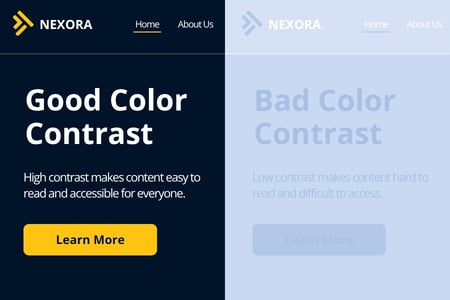
- Poor color contrast: Text that blends into its background is unreadable for visually impaired users.
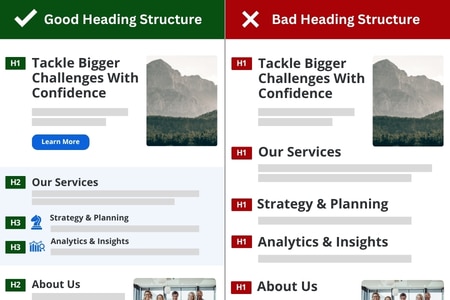
- Inadequate heading structure: Poor heading hierarchy can confuse users and the assistive technologies trying to navigate your website pages.
- Missing captions or audio descriptions: Not having this information shuts deaf and hard-of-hearing website visitors out of video content.
- Unresponsive design: Layouts that don’t adapt to different screen sizes, like phones and iPads, can create real barriers for users with motor disabilities who rely on touchscreens or voice commands.
Left unaddressed, these issues compound each other, and they’re a leading reason accessibility lawsuits keep rising year over year.
Real-World Lawsuits Over Non-ADA Compliant Websites
Non-ADA-compliant websites have real legal consequences, and case volume keeps growing.
Here are some of the most well-known examples:

- Winn-Dixie: A federal judge ruled in 2017 that the grocery chain’s website violated the ADA. The court ordered Winn-Dixie to make it accessible, and the plaintiff’s attorneys collected over $100,000 in fees. The 11th Circuit overturned that ruling on appeal in 2021, finding the ADA didn’t apply in this case. Website accessibility case law is still evolving, and this case shows it.
- Domino’s Pizza: In 2019, the Supreme Court declined to hear Domino’s appeal after a blind customer sued over an inaccessible website and app, letting the case proceed and reinforcing that digital storefronts aren’t exempt from the ADA.
- Harvard University: The National Association of the Deaf sued Harvard in 2015 for failing to caption its online course videos. The case settled in 2020 with Harvard agreeing to add captioning.
- Target: In 2008, Target settled a class action with the National Federation of the Blind for $6 million after Target.com proved inaccessible to blind shoppers.
These historical cases span retail, food service, higher education, and eCommerce, showing that accessibility litigation has affected many industries.
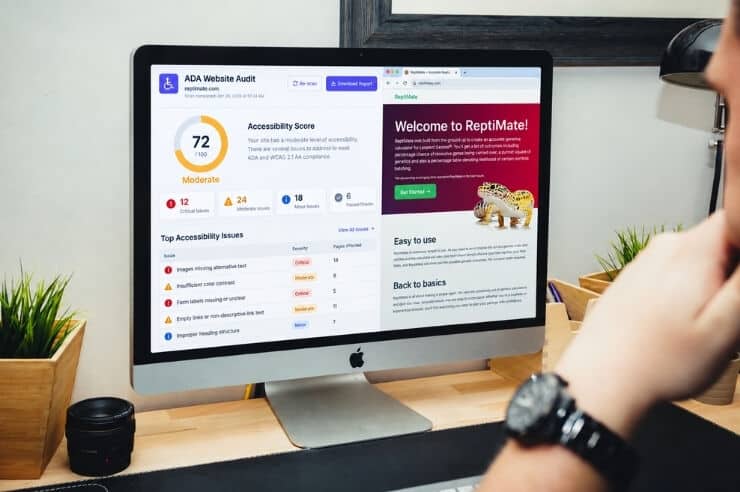
Not sure where your own website stands? Request a free accessibility audit and get a clear picture before a complaint does it for you.
What This Costs You
A non-ADA compliant website doesn’t cost your business in just one way. The damage spreads across legal, financial, and reputational fronts at once.
- Legal: The cases above show settlements ranging from tens of thousands to millions of dollars. ADA claims generally focus on whether an accessibility barrier exists rather than whether a business intended to exclude anyone, although the legal standards and available remedies vary by claim and jurisdiction.
- Financial: Accessibility barriers block visitors from completing a purchase or filling out a form. Each one represents lost revenue, separate from any legal costs.
- Reputational: Accessibility failures spread fast on social media. A business seen as excluding people with disabilities can face public backlash that lasts longer than any settlement.
For the full breakdown of what non-compliance can cost you, including how courts calculate damages and what remediation typically runs, check out our guide to ADA non-compliance consequences.
Examples of Accessible Website Practices
Seeing failures is only half the picture. Compliance isn’t just a legal checkbox either; it shows up in real product decisions, from how a menu is built to how a checkout flow handles a screen reader.
The following sites illustrate accessibility practices, although no public website should be treated as permanently or universally conformant without a current audit:
- Target.com is worth highlighting because it is the same company from the historical lawsuit above. Target settled that case in 2008 and subsequently made accessibility improvements, including support for alt text and assistive technology.
- Apple.com treats accessibility as a design principle, not an add-on. Text and background colors are chosen for contrast from the start. The layout follows a clear visual hierarchy. And VoiceOver support runs throughout the site rather than being patched in after launch.
- BBC.com has long been a model for accessible media. Skip-to-content links, keyboard-navigable menus, and consistent captioning across video content let the BBC serve a genuinely broad audience while not sacrificing design quality.
What’s the common thread? None of these websites look “stripped down” for accessibility. Accessible design and great visual design go hand in hand, and the best examples prove it.
How to Identify Accessibility Issues on Your Website
Catching accessibility problems early is far cheaper than fighting a lawsuit later. Most issues aren’t obvious from a quick glance either. They only arise when you test how a website visitor with a disability would browse the site.
Here’s where to look:
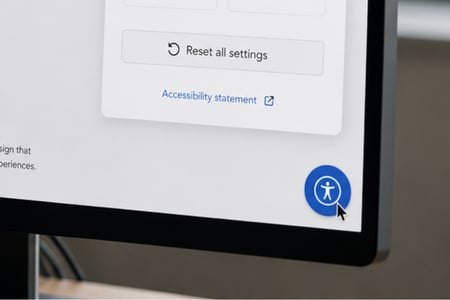
- Automated Accessibility Testing: Tools like WAVE and Axe scan for common issues and are a fast first pass. However, they won’t catch everything. You’ll want to pair an automated scan with a real audit instead of relying on a widget to be ADA-compliant.
- Manual Audits: People who use assistive technology daily catch barriers that automated tools miss.
- WCAG Guidelines: The W3C’s Web Content Accessibility Guidelines continue the technical standard to build against.
- Accessibility Experts: A professional accessibility audit goes deeper than a DIY scan and identifies barriers you’d otherwise miss.
Most sites benefit from combining a couple of these approaches: an automated scan to catch the obvious gaps, followed by a manual or expert review to find what the scan missed. Once you know what’s broken, the next step is simple. Fixing it.
How to Make Your Website ADA Compliant: Where to Start
Once website ADA compliance issues are identified, fixing the most common ones is usually easier than businesses expect. The fixes below address the failures covered earlier in this post. A full remediation may involve more, depending on what a complete audit turns up.
- Alt text: Screen readers can’t understand an image on their own. You’ll need to add a short, descriptive line of alt text.
- Heading structure: When headings are out of order, assistive technology loses track of the page. Fixing the order fixes the navigation.
- Captions and transcripts: Video and audio content needs both, not just one or the other, to reach deaf and hard-of-hearing visitors.
- Color: Meaning shouldn’t depend on color alone. A colorblind visitor needs text or an icon alongside it to know what’s being communicated.
From there, test with actual assistive technology, like screen readers and keyboard-only navigation, after each fix. That confirms the change actually solved the problem, not just that it looks right visually.
Accessibility isn’t a one-time project, either. It needs ongoing monitoring as content and standards evolve, starting with a clear read on where your website currently stands on ADA compliance.
How Oyova Can Fix Your Non-ADA Compliant Website
The examples above make it clear. Non-ADA compliant websites turn into lawsuits, lost revenue, and damaged trust. Compliant sites like Target, Apple, and BBC prove that accessibility and strong design go hand in hand. The difference between the two isn’t luck. It’s a real audit, real fixes, and ongoing attention as standards evolve.
At Oyova, we perform thorough accessibility audits, identify barriers on your site, and provide remediation solutions built to meet ADA and WCAG standards. We also offer ongoing ADA compliance consulting so your site stays accessible as technology and standards change.
Don’t wait for a complaint or a lawsuit to make accessibility a priority. Contact us today for a free accessibility audit and find out exactly where your website stands.
FAQs
The ADA doesn’t explicitly mention websites. However, courts have increasingly applied it to websites connected to a business’s operations. Especially those tied to physical locations. Having a non-ADA-compliant website can lead to lawsuits and court-ordered fixes, though fines aren’t automatic under federal law. Some states, like California and New York, apply stricter standards.
When it comes to ADA compliance, there’s no blanket exemption for private businesses. However, very small businesses with minimal public-facing operations may face lower practical risk. Government entities are subject to Title II with WCAG 2.1 AA specifically written into the rule; most private businesses fall under Title III, where the standard is less explicitly defined but courts still apply WCAG as the benchmark.
Independent studies of the web’s most visited sites consistently find the large majority have at least one detectable WCAG failure, and accessibility lawsuits have climbed steadily each year as awareness and enforcement increase.
If a business serves the public and its website is connected to that business, the practical answer is yes. Courts have repeatedly found that “public accommodation” extends to a business’s website, not just its physical location, and building to WCAG 2.1 AA is the most reliable way to reduce legal risk regardless of how a specific court eventually rules.
Related Posts
What Is ADA Website Compliance & How to Become Compliant
Maybe it started with a demand letter. Perhaps a vendor warned you that your website isn’t accessible. Either...
Read More
What Are the ADA Website Compliance Requirements in 2026?
Website accessibility lawsuits are still a concern for American businesses. In 2025, federal courts received 3,117 of these...
Read More
ADA Website Accessibility Remediation: What to Expect & How It Works
Many websites that look and work great may still need website accessibility remediation, and most owners don’t find...
Read MoreOur Awards