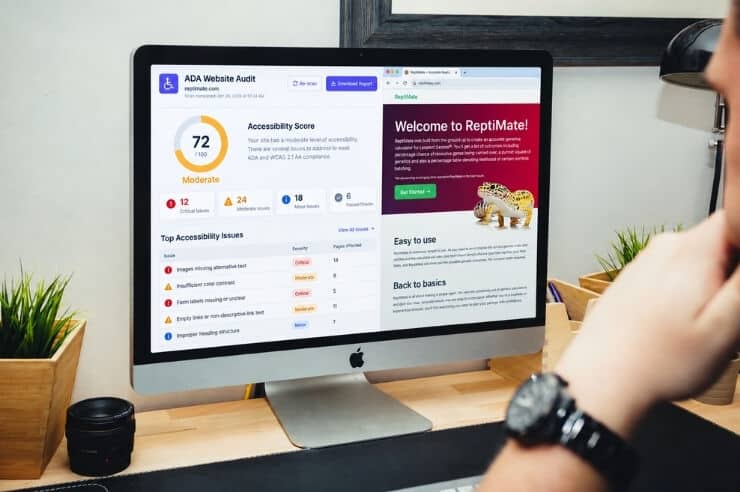
Maybe it started with a demand letter. Perhaps a vendor warned you that your website isn’t accessible. Either way, you’re now stuck on the same question plenty of business owners are asking. What is ADA website compliance, and does my site have it?
The Americans with Disabilities Act doesn’t provide a simple checklist for website accessibility. That leaves many business owners unsure what their website needs to do or whether it meets accessibility standards. We’ll break down what ADA website compliance means and what you can do if your site needs changes.
What Is ADA Website Compliance?
ADA website compliance is about whether people with disabilities can actually use your website. They should be able to move through the site, find what they need, submit a form, or make a purchase without running into accessibility barriers.
The barriers aren’t always obvious. Someone who is blind may use a screen reader to read the content on a page. Someone with limited mobility may navigate with a keyboard rather than a mouse. Other users may need captions, clear headings, readable text, or other accessibility features to interact with a website.
The Web Content Accessibility Guidelines (WCAG) are often used as a practical reference when checking a website for accessibility problems. They cover things you can test on a website, including whether images have text alternatives, whether there’s enough contrast between text and its background, and whether someone can navigate the site with a keyboard.
WCAG 2.2 is the latest version of the guidelines and was published in October 2023. WCAG 2.1 Level AA is the benchmark most U.S. businesses aim for when it comes to ADA compliance.
The Four Principles Behind Accessible Websites
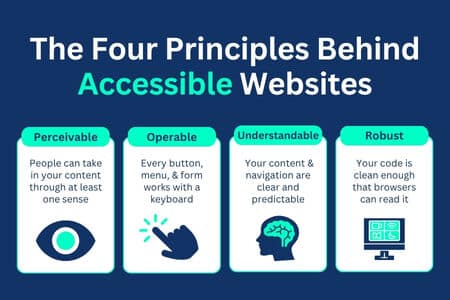
Every WCAG guideline ties back to four principles, often shortened to POUR. They’re a handy way to think about accessibility without memorizing dozens of success criteria.
- Perceivable. People can take in your content through at least one sense, such as reading alt text on an image or following captions on a video.
- Operable. Every button, menu, and form works with a keyboard or other input device, not just a mouse.
- Understandable. Your content and navigation behave in clear, predictable ways, and error messages actually help people fix the problem.
- Robust. Your code is clean enough that browsers and assistive technologies can read it reliably, now and as those tools evolve.
Keep these ADA website compliance principles in your back pocket, because they shape the standards and legal requirements that come next.
ADA Website Compliance Standards and Legal Requirements
When the ADA became law in 1990, commercial websites weren’t part of the picture. ADA law therefore doesn’t spell out technical requirements for making a website accessible. Today, businesses must look to federal regulations, Department of Justice (DOJ) guidance, and court decisions to understand what accessibility requirements may apply to their websites.
The ADA sections that matter most for websites are Title II and Title III.
- Title II covers state and local governments, including public schools, libraries, transit agencies, and courts.
- Title III covers “places of public accommodation,” which includes private businesses that serve the public, like retailers, restaurants, law firms, medical offices, and hotels.
For Title II, the picture got much clearer in April 2024. The DOJ issued a final rule that made WCAG 2.1 Level AA the official standard for state and local government websites and mobile apps. A 2026 update then pushed back the deadlines, and the DOJ’s first steps guide to the Title II web rule now lists April 26, 2027, for governments serving 50,000 or more people and April 26, 2028, for smaller governments and special districts.
Title III is less spelled out, but the direction is the same. The DOJ’s guidance on web accessibility and the ADA states that businesses open to the public must make their websites accessible to people with disabilities. Courts across the country have applied that reasoning in thousands of cases, and WCAG 2.1 AA is the standard judges, plaintiffs’ attorneys, and settlement agreements point to most often.
In plain terms, your website ADA compliance requirements look like this.
- Meet WCAG 2.1 Level AA across your site, including forms, PDFs, and video.
- Keep it that way as you add pages, plugins, and content.
- Be ready to show good-faith effort if your site is ever questioned.
Beyond these basics, the legal requirements for ADA website compliance can shift depending on your industry and whether you’re a public or private entity.
Who Has to Comply?
If your business serves the public, you should assume your website needs to be accessible. That includes small and mid-sized businesses, not just national brands. Plenty of demand letters land on the desks of local companies with a single location and a modest website.
Narrow gray areas exist, such as private clubs, religious organizations, and businesses that operate only online, where courts haven’t always agreed on whether websites must be ADA-compliant at all.
Not sure how your own site measures up against these standards? An ADA compliance audit shows exactly where you stand against WCAG 2.1 AA, so you’re working from facts instead of guesswork. Next, let’s look at what that “AA” actually means.
WCAG Levels Explained
For ADA WCAG compliance, the level you aim for matters. WCAG sorts its success criteria into three conformance levels. Each level builds on the one before it, so meeting AA means you’ve also met everything in Level A.
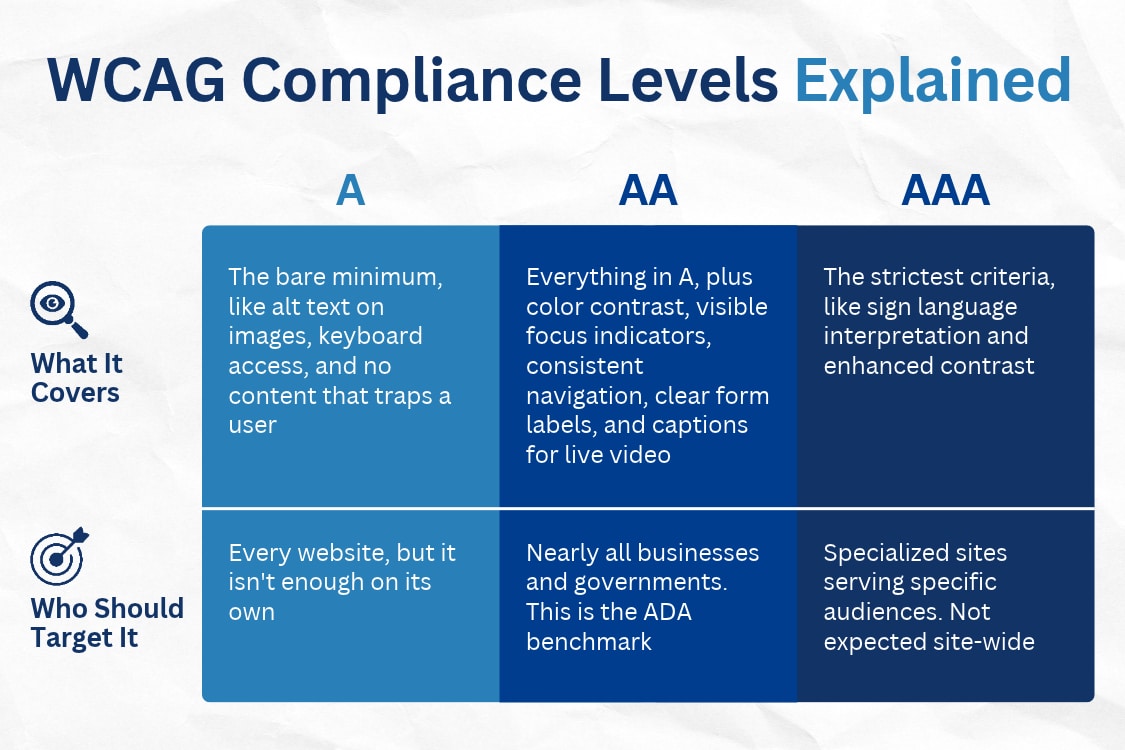
If you remember one thing from this section, make it this. ADA AA compliance, meaning WCAG 2.1 Level AA, is the target. Level A leaves too many barriers in place, and even the W3C notes that AAA isn’t realistic for entire websites.
Each of the ADA compliance levels for websites carries its own set of success criteria, and AA is where most of the real work happens. Knowing the target is one thing, though. Let’s talk about what hitting it looks like on an actual website.
What Makes a Website ADA Compliant?
So, what is ADA compliant in practice? An ADA-compliant website isn’t defined by one big feature. It’s dozens of small details working together. These are the areas that come up most often in audits and in lawsuits.
- Alt text for images. Every meaningful image needs a short text description that a screen reader can read aloud. Decorative images should be marked so assistive tech skips them.
- Keyboard navigation. Visitors should be able to reach every link, menu, and button using only the Tab and Enter keys. If your mega menu only opens on hover, keyboard users are stuck.
- Clear heading structure. Headings should follow a logical order (H1, then H2, then H3) instead of being picked for font size. Screen reader users jump between headings to scan a page, much like sighted users skim.
- Color contrast. Text needs enough contrast against its background to be readable, with a minimum ratio of 4.5 to 1 for regular text at Level AA. Light gray text on a white background is one of the most common failures out there.
- Captions and transcripts. Include captions with video content and provide transcripts for audio. Check automatically generated captions before publishing since they can contain errors.
- Accessible forms. Give each form field a label that identifies what the user needs to enter. Error messages should also explain the problem instead of relying on color alone. For example, putting a red border around a field doesn’t tell someone using a screen reader what needs to be corrected.
- Descriptive links. Link text should make sense out of context. “Download our pricing guide” tells a screen reader user far more than “click here.”
There’s a nice side benefit here, too. Many of these fixes, like descriptive alt text, logical headings, and fast, well-structured pages, line up with SEO best practices. Accessibility isn’t a direct Google ranking factor, but the overlap means the work often pays off in more than one way.
These gaps are also the most common accessibility issues on business websites, and most are easy to fix once you spot them. When they go unaddressed, though, the stakes go beyond a frustrated visitor.
Risks of a Non-Compliant Website
Ignoring accessibility used to feel like a low-risk bet. That’s no longer the case. Here’s what’s really on the line.
- Lawsuits and demand letters. Website accessibility lawsuits are rising, with 3,117 federal cases filed in 2025, a 27% jump over the year before. That count doesn’t include the demand letters that settle quietly before ever reaching a courtroom.
- Lost customers. More than one in four U.S. adults live with a disability. If they can’t navigate your site or finish checking out, they’ll buy from a competitor who made it easy.
- Damage to your reputation. A public complaint or lawsuit can stick to your brand in search results and reviews long after the fixes are made.
- Missed government work. With the Title II rule in place, government agencies need accessible vendors and partners. An inaccessible site or app can take you out of the running for contracts.
The good news is that every one of these risks shrinks once you know where your site stands. That starts with a check.
How to Check If Your Website Is ADA Compliant
Start with an ADA compliance checker if you want to get a quick idea of what may be wrong with your website. A scan can flag missing alt text, contrast issues, empty links, and similar problems.
Don’t stop there. Some accessibility problems require a person to test the site. Try navigating with only a keyboard. Use a screen reader to move through the pages. Fill out a form. Go through the checkout process if your site has one. These tests can uncover problems that automated scans miss. They can also help you tell if your website is ADA compliant.
For a more thorough review, a website accessibility audit can bring those pieces together. The audit can identify accessibility problems across the site and give you a list of changes to work through.
How to Make Your Website ADA Compliant
Getting your website ADA-compliant can feel like a huge project, but it breaks down into a handful of manageable steps.
- Start with an audit. Run automated accessibility tests, then check the results manually. Look at your site against WCAG 2.1 Level AA and pay attention to forms, navigation, images, buttons, and other interactive elements.
- Deal with the bigger problems first. Not every issue affects a visitor the same way. A problem with a contact form, booking tool, or checkout can make an important part of the site unusable. Address those issues before less significant problems, such as an image without alt text on an older blog post.
- Make the necessary changes. Website accessibility remediation can involve changes to the site’s code, content, or design. The work may be as simple as adding a missing label or as complex as updating a larger feature, such as a custom navigation menu.
- Test the changes. Check the updated pages with a keyboard and a screen reader. Go through the same tasks a visitor would, rather than checking individual elements in isolation. If something doesn’t work as expected, it may need another round of changes.
- Check new updates. A website can become less accessible after changes are made. New pages, plugins, PDFs, forms, and design updates are all worth checking before they go live.
ADA website accessibility isn’t something you can address once and forget. Websites change over time, so you need to consider accessibility when you add new content and features.
Get Help With ADA Website Compliance

ADA web compliance comes down to making your site accessible to people with disabilities and addressing the requirements that apply to your business. WCAG 2.1 Level AA is an important reference point, along with applicable regulations and court decisions. Because websites change over time, you should consider accessibility when you update or add to your site.
You don’t have to do it alone. Oyova’s ADA Compliance Audits & Remediation service puts our developers to work testing your site by hand, pinpointing every barrier, and fixing what’s holding you back. We also offer ongoing audits so your site stays compliant as it grows.
Pricing is tailored too, since what a website accessibility audit costs depends on factors like your site’s size, complexity, and custom functionality.
Ready to find out where your site stands? Reach out to Oyova to schedule your ADA compliance audit.
Disclaimer: The information provided in this blog is for general informational purposes only and is not intended as legal advice. The contents of this blog may not reflect the most current legal standards or interpretations. Please consult with a qualified attorney for specific legal advice regarding ADA compliance or other legal issues. Oyova does not guarantee the accuracy, completeness, or usefulness of any information on this site and is not responsible for any errors, omissions, or results obtained from using this information.
FAQs
An ADA-compliant website is accessible to people with disabilities. Accessibility can involve keyboard navigation, screen readers, captions, accessible forms, and other features that affect how someone uses a site. WCAG provides the guidelines commonly used to evaluate these features, including the Level AA criteria.
WCAG 2.1 Level AA is the level specifically referenced in the federal rule for state and local government websites and mobile apps. Private businesses are in a different legal position because the ADA does not specify a WCAG level for their websites. Even so, WCAG 2.1 AA is frequently referenced in accessibility cases, settlements, and remediation work.
It depends on the type of organization. State and local governments have specific federal web accessibility requirements. Private businesses that serve the public are also subject to Title III of the ADA, although the law does not give them a specific technical standard to follow. The Department of Justice has stated that businesses open to the public need to make their websites accessible to people with disabilities.
Being a small business doesn’t automatically exempt you from ADA requirements. Title III applies to businesses that serve the public, including many smaller businesses. The steps needed to address accessibility can vary depending on the website, its features, and the business itself.
An accessibility issue can lead to a demand letter or lawsuit. Depending on the circumstances, a business may also face legal expenses, settlement costs, or website remediation work. An inaccessible website can also make it harder for people with disabilities to use your services or complete basic tasks online.
Related Posts
What Are the ADA Website Compliance Requirements in 2026?
Website accessibility lawsuits are still a concern for American businesses. In 2025, federal courts received 3,117 of these...
Read More
ADA Website Accessibility Remediation: What to Expect & How It Works
Many websites that look and work great may still need website accessibility remediation, and most owners don’t find...
Read More
Website Accessibility Audit Cost and What Drives It
If you’ve started researching website accessibility audits, you’ve probably noticed there’s no one-size-fits-all price. Some websites can be...
Read MoreOur Awards