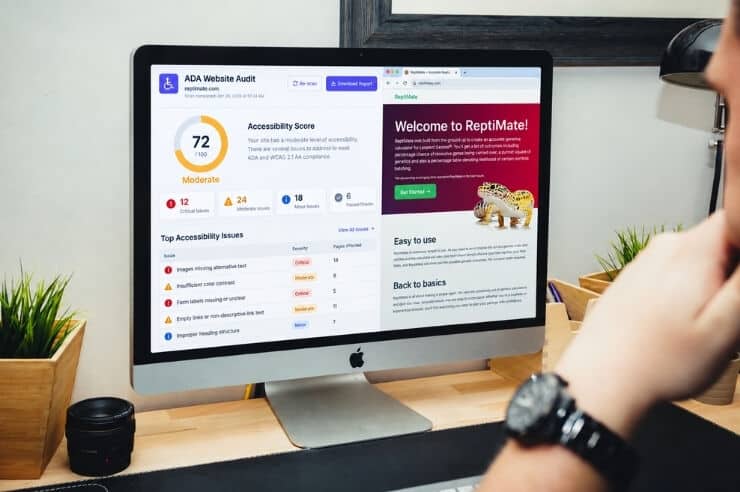
Most businesses don’t think about accessibility until a customer with a disability can’t complete a purchase, fill out a form, or browse the site with a screen reader. By then, they’ve likely lost a sale and may have opened themselves up to legal risk over an issue that’s usually straightforward to fix. An ADA website compliance checker (also called a website accessibility checker) can help you quickly identify ADA compliance issues like missing alt text, poor color contrast, or broken heading structure, so you can prioritize fixes and make your site more welcoming.
Interested in using an ADA compliance checker to scan your website? This article breaks down the best ADA compliance scanning tools, shows what each tool does well (and what it can’t catch), and explains how to choose the right approach, whether you’re a small business, a growing company, or an enterprise team administering complex sites.
What is ADA Compliance?
ADA website compliance means your website is usable by people with disabilities, including users who rely on screen readers, keyboard navigation, voice controls, captions, or other assistive technology. While the ADA doesn’t list a single “website checklist” inside the statute, WCAG (Web Content Accessibility Guidelines) is the most widely accepted standard used to evaluate and remediate accessibility issues.
Most businesses aim for WCAG 2.1 Level AA compliance. However, an increasing number are aiming for WCAG 2.2 where applicable, because it balances meaningful accessibility improvements with realistic implementation across typical web experiences.
How to Check Your Website for ADA Compliance in 10 Minutes
 You don’t need a full ADA website audit to get a first read on where your site stands. In about 10 minutes, you can run through four steps and walk away with a real answer. Here’s what you can do:
- Run a page-level scan using a browser extension (fastest feedback)
- Scan key templates (homepage, product/service pages, contact form, checkout/login)
- Try navigating those pages and check whether your tab order and focus make sense
- Take what you found and tackle the highest-impact issues first
This approach gives you immediate visibility into common WCAG failures while keeping expectations realistic: automated scans are necessary, but not sufficient for true compliance.
6 ADA Website Compliance Checkers
If you’re looking for an ADA website compliance checker, there are six tools that make this list, and they’re not interchangeable. A marketer checking one page before it goes live needs something different than an engineering team maintaining accessibility across hundreds of templates. Here’s how the options compare and where each one fits.
1) WAVE (WebAIM) – Best Free Visual Page Scanning
WAVE is usually the first tool people try, mostly because it’s free and runs right in the browser. Load a page, and it marks up the problems in place, things like missing alt text, broken headings, low contrast, and ARIA mistakes, so you’re not digging through a separate report to find them. It checks one page at a time, so once you need a read on how the whole site behaves, you’ll want something else alongside it.
2) axe DevTools – Best for Developers and WCAG-Driven Fixes
axe fits naturally into a dev workflow, often running in CI right alongside unit tests. Findings map to WCAG success criteria, so there’s a clear list of what to fix instead of a vague summary to interpret. Whether someone using a screen reader can actually get through your checkout flow is a different question, and one no automated tool answers for you.
3) Siteimprove Accessibility – Best for Enterprise Monitoring + Reporting
Picture a website with dozens of people publishing content across a dozen templates. A scan run once is out of date within a week. Siteimprove is priced for that problem by providing regular oversight and reporting instead of a one-time snapshot.
4) UserWay Scanner – Best “Easy Setup” Scanning for SMBs
UserWay is built for teams without a developer on standby. Install it, run the scan, get a list of common WCAG failures. Worth remembering: the widget that often comes bundled with it isn’t a substitute for actually fixing the site.
5) AccessiBe – Automated Overlay-Style Approach
AccessiBe is one of the more debated tools on this list. It’s an AI overlay you can add without touching your code, which is why teams in a hurry lean on it. However, it doesn’t fix anything underneath. It also won’t hold up as legal protection on its own.
6) Accessibility Checkers – Best Budget-Friendly Starting Point
An accessibility plugin or scanner may be a good choice if you’re on a budget. They will give you the basics, but it won’t guarantee compliance. Also, keep in mind the quality differs between them, so do your research before selecting one.
Comparison Chart: Key Features of ADA Compliance Checkers
| Tool | Cost | Best For | Strengths | What It Misses |
| WAVE | Free | Quick checks | Visual in-page feedback | Full keyboard + screen reader UX |
| axe DevTools | Free/Paid | Dev + QA | WCAG-driven dev insights | Human usability validation |
| Siteimprove | Paid | Monitoring + reporting | Businesses seeking ongoing governance | Still needs manual + remediation |
| UserWay Scanner | Free/Paid | SMB | Easy start | Doesn’t equal compliance |
| AccessiBe | Paid | Overlay exploration | Automation claims | No guarantee; code fixes still needed |
| Accessibility Checker tools | Free/Paid | Budget audits | Basic issue detection | Output varies; needs verification |
Not sure which of these fits your site? Talk to Oyova’s accessibility team about a quick audit. We’ll tell you what’s actually broken and what a scanner alone would have missed.
Best Free ADA Compliance Checkers
If budget is the deciding factor, three of the six tools above have genuinely usable free tiers:
- WAVE is fully free and remains the best starting point for a visual, page-by-page scan. No account or install required.
- axe DevTools offers a free browser extension that developers can run directly against a live page or staging environment for WCAG-aligned findings.
- UserWay offers a free scan to surface baseline issues, though its paid tier is where the ongoing monitoring features live.
A free ADA website compliance checker is a solid way to get your first read on a site, but free tools generally stop at detection. They’ll flag what’s wrong without prioritizing it by practical impact or validating that a fix actually resolves the barrier. That gap is where paid tools, and eventually manual testing, take over.
How to Choose the Best ADA Compliance Checker
The best accessibility checker depends on three things:
- How complex your site is,
- How often you publish changes, and
- Whether you have technical resources on hand to implement fixes.
If you’re a small business: Be certain to prioritize an ADA compliance checker that provides clear, easy-to-act-on findings. When issues go beyond simple content edits, bring in a remediation partner to close the gap.
If you’re an enterprise: prioritize monitoring, governance, and workflow integration, so accessibility doesn’t regress every time content changes or a new feature ships.
Either way, the “right” solution is rarely just one tool. It’s usually a combination of automated scanning, manual testing, and remediation.
Testing a new tool for the first time? Run it against your homepage and one or two high-traffic templates before rolling it out further. That’s enough to tell whether an ADA site checker’s findings actually match what you’re seeing on the page, before you commit to it site-wide.
What Accessibility Tools Can’t Tell You
Things like missing alt text, contrast failures, and broken headings can be flagged by accessibility tools. But they won’t catch things like a keyboard trap that leaves someone stuck in a modal or a focus order that jumps around the page. Pages like that can pass every automated scan and still fail the people using them.
That’s why the highest-performing accessibility programs treat scanners as an early-warning system, and rely on manual validation (keyboard-only journeys, screen reader checks, form/task completion testing) to confirm real-world usability.
Risks of ADA Non-Compliance (And Why Scanning Alone Isn’t Enough)
 When websites are inaccessible, businesses can experience a myriad of issues, including demand letters, lawsuits, damage to reputation, and lost revenue. The number of lawsuits varies, but reputable accessibility litigation trackers report thousands of cases annually, which is why making proactive ADA website compliance the safer long-term strategy.
The goal isn’t “scan once and forget it.” The goal is ongoing accessibility. Scan, validate, remediate, and monitor. Especially after redesigns, content updates, plugin installs, and feature releases.
Examples of Non-ADA Compliant Websites
A quick scan will usually turn up a handful of frequent problems on sites that haven’t been reviewed for accessibility:
- Icon-only navigation and buttons with no accessible label, so a screen reader announces “button” with no indication of what it does.
- Low-contrast text over imagery, common in hero banners and promotional graphics, that fails WCAG contrast minimums even though it looks fine visually.
- Forms without properly associated labels, where a sighted user can see “Email” next to a field but a screen reader user has no way to connect the two.
These are exactly the kind of issues a checker tool will flag quickly. See our full breakdown in Examples of Non-ADA Compliant Websites for more patterns and how to fix them.
Examples of ADA Compliant Websites
Well-built ADA accessible sites share a few habits, and none of them require sacrificing design:
- Descriptive link and button text. Instead of a generic “click here” or “learn more,” the link itself tells you where it’s going, like “download the pricing guide.”
- A logical heading structure. Sections are nested in order, so screen reader users can jump straight to the part of the page they need instead of listening through the whole thing.
- Visible, consistent focus states. Keyboard users always know exactly where they are on the page, whether that’s a form field, a menu item, or a button.
Accessibility built in from the start, not patched in after a complaint, is what separates these sites from the rest.
How Oyova Helps You Get (and Stay) Accessible
The tools above will tell you what’s broken. Scanning, comparing free versus paid options, and running a 10-minute check all give you a starting point, but an ADA website compliance checker alone won’t get you to true compliance. That takes manual testing, remediation, and ongoing monitoring layered on top of the scan.
At Oyova, we help organizations move from “we found errors” to “we fixed the barriers.” Our team integrates automated tools, manual testing, remediation support, and ongoing monitoring to help keep your website ADA compliant.
If you’re serious about accessibility, the fastest path is an ADA compliance audit that identifies high-impact issues and a remediation roadmap that’s implemented without breaking UX, SEO, or conversion flows.
Ready to move beyond scanning and get real accessibility outcomes? Schedule an ADA website audit with Oyova.
FAQs
Start with an ADA website compliance checker to catch the obvious issues fast. From there, walk through the site yourself using only a keyboard, and run a screen reader over a few key pages. The scan gets you most of the way; the manual check is what actually confirms compliance.
WAVE and axe cover most of what people need at no cost. WAVE is the easier starting point if you just want to see problems on the page. Axe leans more technical, with findings tied directly to WCAG criteria.
No. A scanner can tell you what’s broken, not whether your site actually works for the people using it, and that’s what courts and regulators end up caring about. Compliance comes down to the real user experience and how well the issues get fixed.
At a minimum, monthly and after any major release. Best practice is continuous monitoring plus targeted manual testing during redesigns and feature changes.
Start with a professional audit to prioritize issues by severity and template impact. Then remediate high-impact barriers first, such as navigation, forms, contrast, headings, and alt text.
Related Posts
What Is ADA Website Compliance & How to Become Compliant
Maybe it started with a demand letter. Perhaps a vendor warned you that your website isn’t accessible. Either...
Read More
What Are the ADA Website Compliance Requirements in 2026?
Website accessibility lawsuits are still a concern for American businesses. In 2025, federal courts received 3,117 of these...
Read More
ADA Website Accessibility Remediation: What to Expect & How It Works
Many websites that look and work great may still need website accessibility remediation, and most owners don’t find...
Read MoreOur Awards