Many websites that look and work great may still need website accessibility remediation, and most owners don’t find out until something goes wrong. For visitors who rely on screen readers, keyboards, or captions, a missing form label or an unreadable button is enough to send them to a competitor. Those gaps are easy to miss from the inside, and they can cost you customers long before they cost you anything else.
There were also some important changes in 2026. The Department of Justice changed its web accessibility deadlines for public entities, and private businesses are still dealing with accessibility lawsuits. If accessibility has not been a priority for your website, now is a good time to see where problems may exist.
Below, we’ll look at what happens during website accessibility remediation, starting with the initial audit and continuing through the fixes and ongoing maintenance.
What Is Website Accessibility Remediation?
Website accessibility remediation means updating a website’s content, design, and code to meet the Web Content Accessibility Guidelines (WCAG), the standard courts and regulators use to measure ADA compliance.
The goal is simple. Anyone should be able to read, navigate, and complete tasks on your site, whether they use a mouse, a keyboard, a screen reader, or voice commands.
The good news is that most websites struggle with the same common ADA problems. These barriers show up in nearly every audit, and they make up most of the top accessibility violations found across the web.
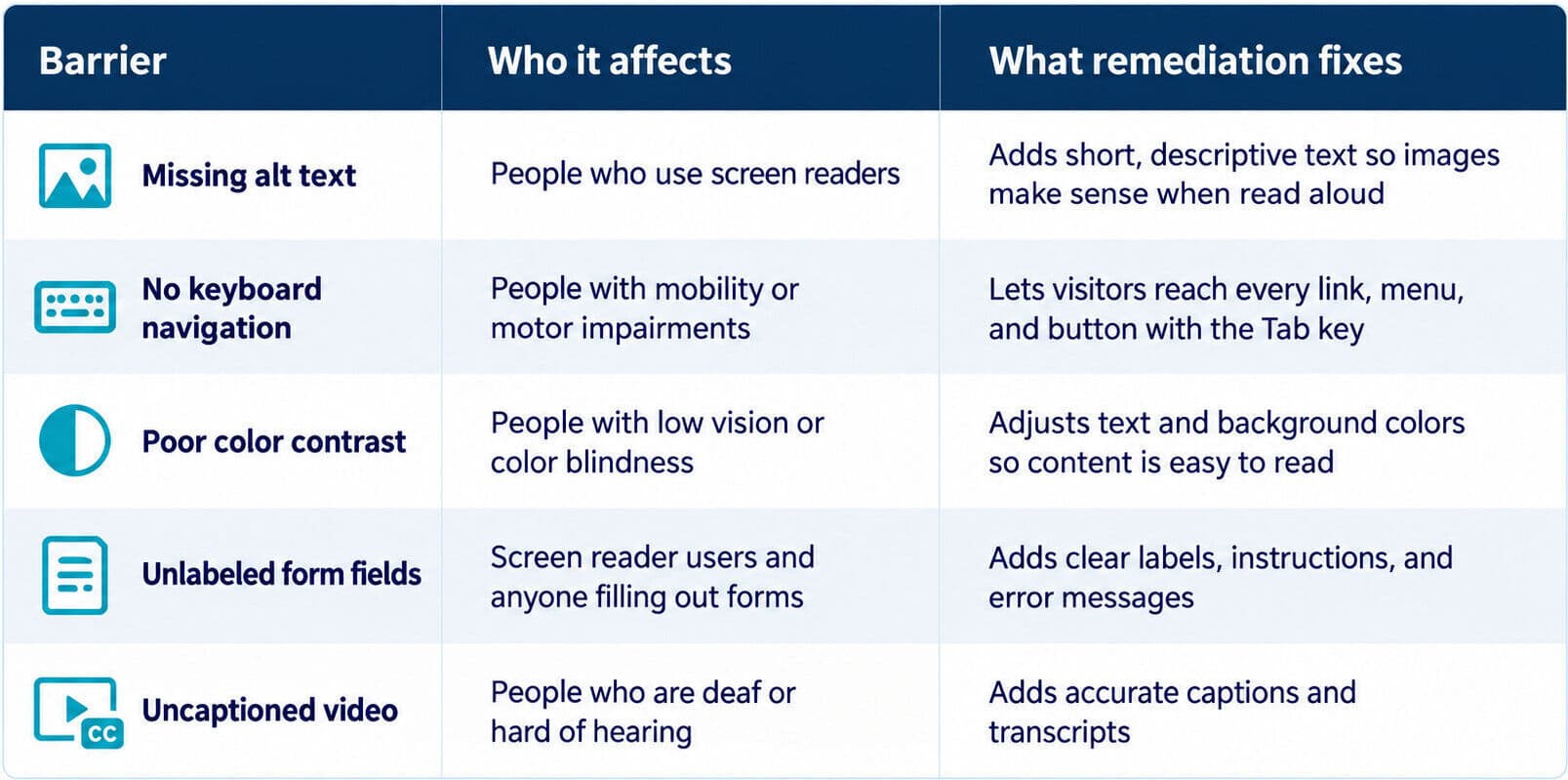
Some of these ADA updates take minutes to fix once you know what you’re looking for. Others, like a checkout that traps keyboard users, will likely need a developer to rework the code.
Why Website Accessibility Remediation Matters
People with disabilities aren’t a niche audience. In fact, more than 1 in 4 U.S. adults live with some type of disability, and worldwide the WHO estimates about 1.3 billion people experience significant disability. When your website doesn’t work for them, they don’t wait around. They leave and buy from someone whose site does.
Then there’s the legal side you need to consider. Thousands of ADA website compliance lawsuits are filed every year, and many of them target small and mid-sized businesses that assumed they were too small to notice. A settlement plus legal fees almost always costs more than the remediation would have.
Some accessibility fixes also address problems that other visitors run into. A visitor may have trouble reading low-contrast text, figuring out where to go next, or correcting a form submission when the site gives little guidance. Fixing those issues can make the site less frustrating to use.
2026 ADA Compliance Deadlines and What They Mean for Remediation
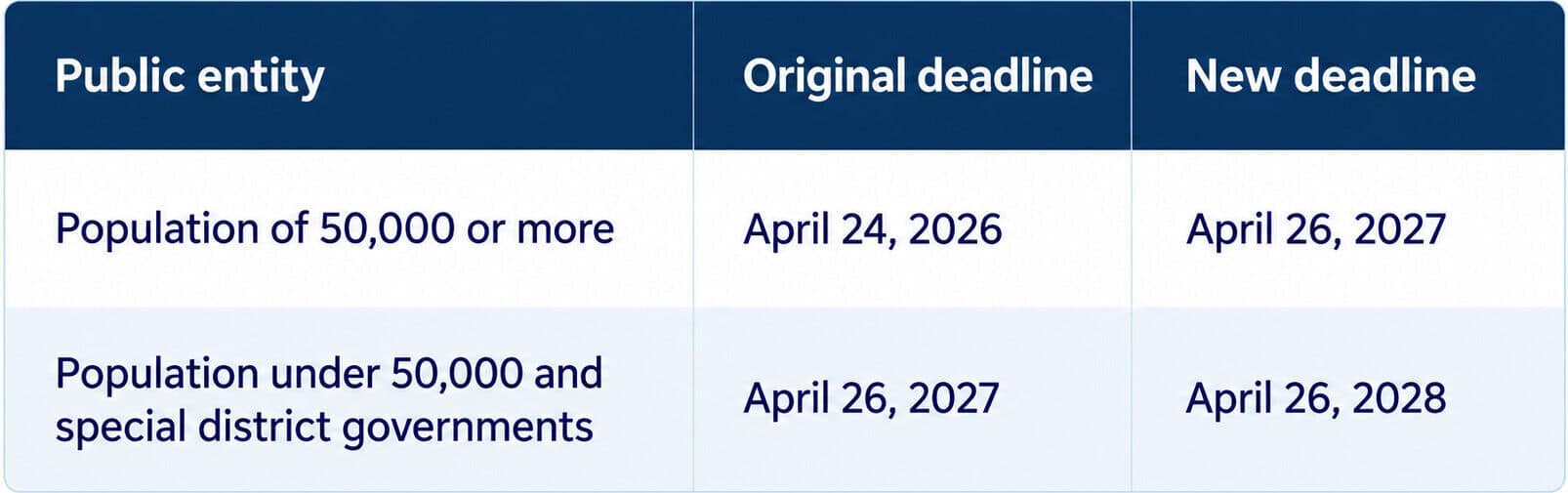
The biggest accessibility news of the year came from the Department of Justice. In April 2024, the DOJ finalized a rule under Title II of the ADA requiring state and local governments to make their websites and mobile apps conform to WCAG 2.1 Level AA. Large public entities originally had until April 24, 2026, to comply.
Then, just four days before that deadline, the DOJ published an interim final rule extending every compliance date by one year.
If you run a private business, Title II doesn’t apply to you directly. Private businesses fall under Title III, which still has no formal web rule. The Title II rule matters because it’s the first time the federal government has named a specific technical standard. WCAG 2.1 AA is now the benchmark plaintiffs, courts, and consultants point to when discussing legal ADA website compliance requirements. The rule also reaches content public entities provide through contractors, so agencies and vendors that build or manage government sites are on the hook too.
The one-year extension gives public entities additional time to meet the updated deadlines, but it does not change the accessibility standard itself. It also does not mean existing accessibility concerns can be put aside. For larger websites, reviewing the site and addressing accessibility issues can take considerable time, so starting the remediation process earlier can make the work more manageable.
Not sure where your site stands? Oyova’s developers handle ADA compliance audits and remediation from the first scan through the final fix, so you know exactly what needs attention and in what order.
Key Elements of an Effective Website Accessibility Remediation
ADA website accessibility remediation touches four areas of a website. Most projects involve all four, though the balance depends on how your site was built and how much media it uses.
1. Visual Content
Images, graphics, and color choices shape how your site looks, and they’re also where many barriers hide.
Color contrast is usually the first fix. WCAG’s contrast minimum criterion calls for a ratio of at least 4.5 to 1 between regular text and its background, and 3 to 1 for large text. Light gray text on a white background looks sleek, but it’s hard for people with low vision to read.
Image alt text comes next. Every meaningful image needs a short description a screen reader can read aloud, while purely decorative images should be marked so screen readers skip them.
Finally, never use color as the only way to convey information. A form that marks errors in red alone leaves colorblind visitors guessing, so pair color with text or an icon.
2. Navigation and Structure
Visitors need to be able to figure out where they are and where to go next. That can become difficult when a page has a confusing heading structure or when important parts of the site aren’t properly identified in the code.
The HTML behind a page can help. Using elements such as <nav> and <main> gives assistive technology more information about a page’s different parts. Headings matter as well. When they follow a sensible hierarchy, someone using a screen reader can move through the page and find the section they need without reading everything from top to bottom.
Keyboard access is another part of the process. Someone should be able to move through menus, links, buttons, and other controls without using a mouse. A visible focus indicator makes it easier to tell where you are, while a skip link can prevent keyboard users from having to move through the same navigation menu every time they visit a page.
3. Forms and Interactive Elements
Forms can create some of the biggest accessibility problems on a website. A visitor may be able to see a form and understand what to enter, while someone using a screen reader gets very little information about the fields.
The labels need to be connected to their corresponding fields in the HTML. Error messages matter, too. If a submission fails, the visitor should be able to tell what went wrong and what needs to be changed. Instructions should be easy to find rather than appearing only after an error occurs.
Other parts of a site can require the same kind of attention. Dropdown menus, accordions, pop-ups, and similar controls need to communicate their state and function to assistive technology. ARIA can help when standard HTML doesn’t provide enough information.
The checkout process is particularly important for an eCommerce site. If someone cannot navigate the form or complete a required step with a keyboard or assistive technology, the accessibility issue can also become a lost sale. That’s why accessible checkout processes deserve a close look during remediation.
4. Video and Audio Content
Video and audio can be powerful, but only if everyone can access them.
Videos need accurate captions synced to the audio, not auto-generated text riddled with errors. Podcasts and audio clips need transcripts that include meaningful sounds like music cues or laughter. Videos that rely on visuals to tell the story may also need audio descriptions for viewers who are blind.
The media player itself matters too. Play, pause, and volume controls should work with a keyboard, be clearly labeled for screen readers, and never autoplay with sound.
How Website Accessibility Remediation Works
Accessible website remediation follows a predictable path, whether your site has 10 pages or 1,000. Here’s what each step looks like and what you can expect:
Step 1. Audit Your Website
Everything starts with an ADA website accessibility audit. Automated scans quickly catch obvious errors, like missing alt text and low-contrast text. A developer can then review your website by hand, going through pages and testing with a screen reader to find the problems software can’t see.
Step 2. Set Priorities
An audit can turn up a long list of accessibility issues, but that doesn’t mean you need to address them all at once. Some problems can prevent a visitor from using an important part of the site, while others have a smaller impact.
For example, a keyboard user who cannot reach the checkout button may be unable to complete a purchase. A minor contrast issue in a less important area of the page may not have the same effect. The remediation team can use these differences to decide which problems to address first.
Step 3. Build Your Remediation Plan
After reviewing the audit findings, the next step is figuring out what needs to happen to fix them. Some issues may require changes to the site’s code. Others could involve the design or the content itself.
The plan should identify the work involved, who will handle it, and when it needs to be completed. It can also clarify the project’s scope, which matters when estimating website ADA compliance costs.
Step 4. Implement the Fixes
This is the stage where the issues identified during the audit are actually addressed. The work will depend on what the audit found. Code may need changes to improve keyboard navigation or ARIA implementation. Designers may need to revisit colors, spacing, or other visual elements. Content changes can include writing alt text or adding captions and transcripts.
Not every change will be obvious when you visit the finished site. In many cases, the goal is to make the existing website work better without changing its overall appearance. Making a website ADA-compliant does not necessarily mean changing its design or functionality.
Also, be cautious about accessibility shortcuts. An overlay or accessibility widget may add some tools to a website, but it does not address every underlying accessibility issue. Accessibility widgets are not a substitute for remediation.
Step 5. Run a Final Review
Once the fixes are in, your website gets tested again from top to bottom to confirm every issue from the audit has been resolved and nothing new broke along the way.
Testing and Verifying Website Accessibility Remediation
Accessibility remediation testing uses two methods:
- Automated Testing: Automated ADA website compliance checkers are fast and great at catching code-level errors across hundreds of pages. What they can’t do is judge whether alt text actually describes an image or whether a form makes sense to someone who can’t see it.
- Manual Testing: A developer navigates the site using only a keyboard, runs it through screen readers like NVDA, JAWS, and VoiceOver, and zooms pages to 200% to make sure nothing breaks. Anything that slipped through gets fixed before the updates go live.
Maintaining Compliance After Website Accessibility Remediation
Remediation isn’t a one-and-done project. Every new blog post, product page, and image upload is a chance for a barrier to sneak back in, and WCAG itself keeps evolving, with version 2.2 adding new success criteria on top of 2.1.
Fixing the current accessibility issues is only part of the job. A new page, image, form, or website feature can introduce a problem later. Regular reviews can help catch those changes, and the people responsible for publishing content should know what to look for before something goes live.
For sites that change often, accessibility checks can simply become part of the normal website update process. Ongoing UX accessibility can help you address issues as they appear instead of waiting until another large remediation project is necessary.
Benefits of Website Accessibility Remediation for Your Business
The payoff of accessibility remediation for your website goes well beyond checking a legal box.
- More people can use your website. When visitors aren’t blocked by inaccessible forms, navigation, images, or other features, they have a better chance of finding what they need and becoming customers.
- Accessibility can support your SEO efforts. Some remediation work overlaps with technical and on-page SEO. Descriptive image text, logical headings, and properly structured HTML can give search engines more context about your content. That’s one reason ADA compliance and SEO are often addressed together.
- Visitors may have an easier time getting around. Changes to navigation, text, forms, and other parts of the site can remove unnecessary obstacles for people using different devices and technologies. A smoother experience can also make it easier for visitors to complete a purchase or contact your business. See how ADA compliance affects user experience.
- You can reduce some legal exposure. Accessibility lawsuits can lead to legal expenses, settlements, and other costs. Addressing accessibility issues and maintaining the site afterward can help reduce problems that could otherwise become sources of conflict. Learn more about the consequences of ADA non-compliance.
Getting Expert Help With Website Accessibility Remediation
Some fixes are easy to handle in-house. Others are a lot to take on without a developer who knows WCAG inside and out. It usually makes sense to bring in professional help when your website is large or custom-built, your team lacks accessibility experience, you’ve received a demand letter, or you’re facing a firm compliance date.
The right partner saves you time and guesswork and makes sure the job gets done right. At Oyova, our developers audit your site, prioritize what matters most, fix the code, design and content issues, and retest everything to confirm it works. We also offer ongoing audits and remediation, so your site stays accessible as it grows. If you’re ready to make your website usable for everyone, our team is here to help.
Disclaimer: The information provided in this blog is for general informational purposes only and is not intended as legal advice. The contents of this blog may not reflect the most current legal standards or interpretations. Please consult with a qualified attorney for specific legal advice regarding ADA compliance or other legal issues. Oyova does not guarantee the accuracy, completeness, or usefulness of any information on this site and is not responsible for any errors, omissions, or results obtained from using this information.
FAQs
Website accessibility remediation is the process of finding and fixing barriers on a website so people with disabilities can use it. It covers issues like missing alt text, poor color contrast, and forms that can’t be navigated by keyboard, bringing a site in line with ADA and WCAG standards.
There isn’t a set timeline for website accessibility remediation. The amount of work depends on the website’s size, how it was built, and how many accessibility issues the audit uncovers. A smaller site with a limited number of problems may be addressed relatively quickly, while a larger site may require several rounds of fixes and testing over a longer period.
Cost depends on the number of pages, how the site is built, and how many barriers the initial audit turns up. Our guide to website ADA compliance costs walks through what drives the price.
Related Posts

Website Accessibility Audit Cost and What Drives It
If you’ve started researching website accessibility audits, you’ve probably noticed there’s no one-size-fits-all price. Some websites can be...
Read More
8 Most Common Website Accessibility Issues
Website accessibility issues are easy to miss, especially when your site looks and works fine to you. However,...
Read More
Do Websites Have to Be ADA Compliant?
Do websites have to be ADA compliant? In practice, yes. Courts and the Department of Justice treat business...
Read MoreOur Awards